
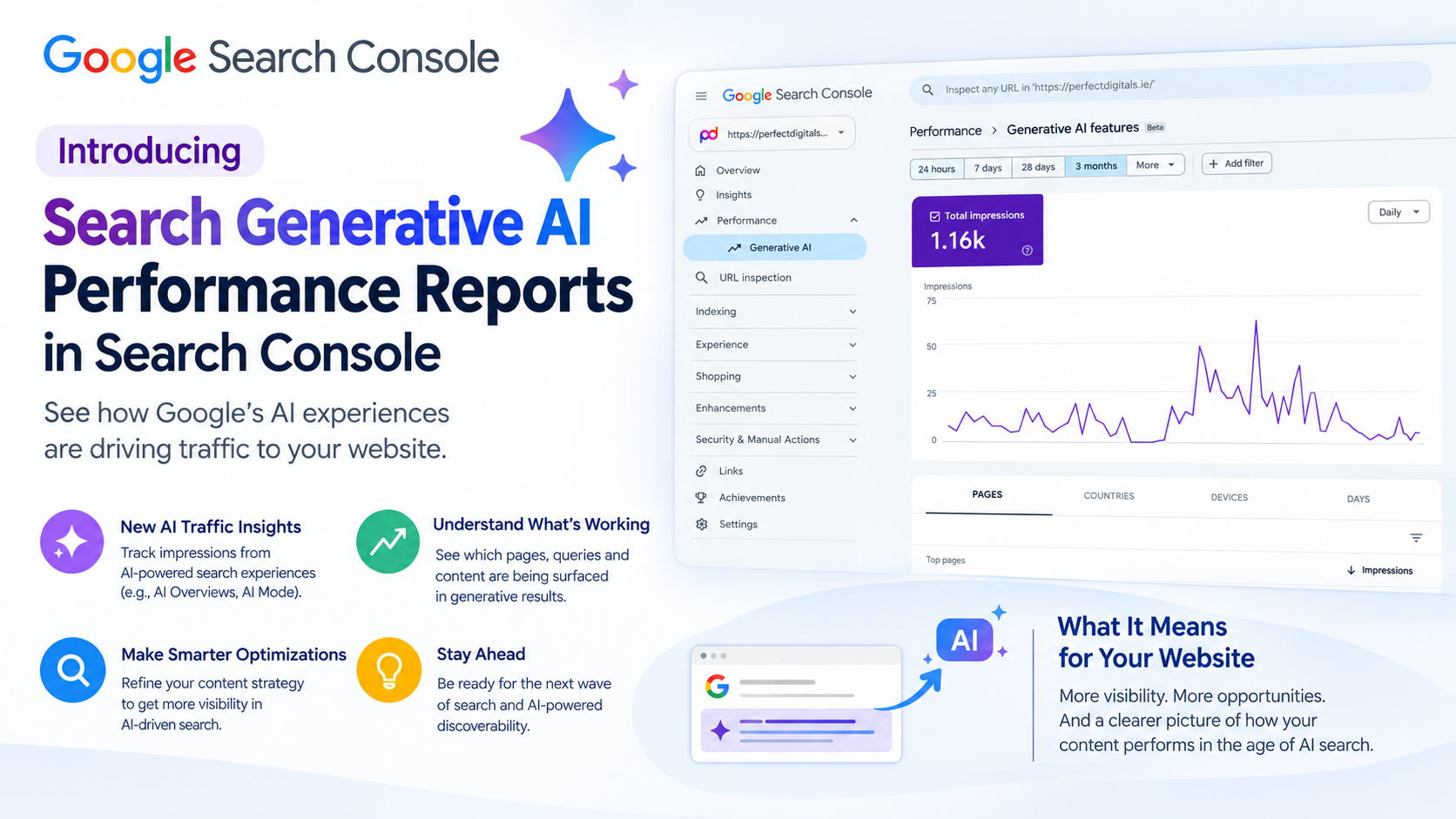
For the past couple of years, one of the most common questions we’ve heard from clients is some version of: “How do I know if my website is actually showing up in AI Overviews or ChatGPT-style answers?” Until recently, the honest answer was: you couldn’t, not with any real precision. Google Search Console showed you clicks and impressions from traditional blue-link search results, but anything happening inside AI Overviews or AI Mode was invisible – a blind spot in exactly the place search behaviour is shifting fastest.
That’s now changing. Google has rolled out dedicated Generative AI performance reports inside Search Console, giving site owners a first-party way to see how their content performs specifically within Google’s AI-driven search surfaces. Here’s what these reports actually show, what they don’t, and – more importantly – what your business should do with the data. If you’d rather have a specialist walk through your own site’s numbers, our SEO & AI Engine Optimisation team can talk you through it — or you can see how much revenue your business could generate online with our free calculator first.
What Are the Generative AI Performance Reports?
Google’s announcement frames the new reports simply: they exist to give site owners a dedicated view of their impressions inside generative AI features on Search — AI Overviews and AI Mode- as well as generative AI features that surface in Discover. In practical terms, Google has pulled apart a layer of search performance that used to be invisible, or bundled anonymously into your regular organic numbers, and given it its own home in Search Console.
You’ll find the new reports sitting under Performance → Generative AI in the Search Console sidebar, right alongside the classic Performance report most site owners already check regularly. There are two versions: one covering generative AI features in Search (AI Overviews and AI Mode), and a separate one covering generative AI features in Discover.
What You Can Actually See in the Report
Google’s help documentation lays out a fairly specific set of use cases. You can use the report to track how your impressions from generative AI features change over time, identify which pages are earning the highest or lowest impressions within those features, and see where that visibility is geographically coming from – for example, broken down by device or country.
Data is grouped using familiar Search Console dimensions:
- Pages — grouped by the final URL a generative AI feature links to, after any redirects, similar to how the standard performance report attributes data
- Countries — grouped by where the search originated
- Dates — daily, weekly, or monthly, all reported in Pacific Time
This is genuinely useful. For the first time, you can see, page by page, which parts of your site are earning visibility inside AI-generated answers – rather than guessing based on anecdotal client feedback or manual spot-checks against ChatGPT and AI Overviews.
What the Report Doesn’t Show You (Yet)
Before you get too excited, it’s worth being clear-eyed about the gaps. Industry coverage of the launch has been consistent on this point: the reports break down impressions by page, country, device, and date, but they stop short of including click data. That’s a meaningful limitation – you can see that your page appeared inside an AI Overview, but not whether anyone actually clicked through to your site as a result.
Several early analyses have flagged the same missing pieces: no click-through data, and no visibility into the specific prompt or question a user typed that triggered your content’s appearance. For businesses used to keyword-level detail in the standard Performance report, this will feel like a step backward in granularity – even though it’s a genuine step forward in overall visibility.
Google itself has been upfront that this is a starting point rather than a finished product. The company has said it’s continuing to work with website owners to understand what additional insights would be most useful, with more metrics expected to be added over time. Translation: click data and prompt-level detail may well be coming, but they’re not here yet.
Not Every Site Sees the Report the Same Way
If you check Search Console today and don’t see much data – or any data – that’s not necessarily a technical problem on your end. Google’s documentation is explicit that not every property has access yet, since the rollout has been phased, and that a property may show little or nothing simply because it hasn’t received enough impressions within generative AI features to populate the report.
That said, the rollout has moved quickly. Google has since confirmed that the generative AI performance reports — tracking AI Overviews and AI Mode impressions — are now available to all sites worldwide, alongside a related opt-out control for site owners who don’t want their content appearing in these AI features at all. So if you’re still not seeing data, the more likely explanation is genuinely low current impression volume in AI features — which is itself a useful signal about where your AI visibility currently stands.
Why This Matters More Than It Might Seem
It’s easy to read this as “just another Search Console tab.” It isn’t. Commentary on the launch has been consistent that its real significance isn’t a new ranking system, but a dedicated reporting lens for AI-driven surfaces — one that lets site owners treat AI visibility as a defined, measurable part of search performance, rather than an invisible side effect of their broader organic activity.
That distinction matters commercially. A page can now be earning meaningful visibility — appearing inside an AI Overview seen by thousands of people — without a single one of those impressions ever showing up as a click anywhere in your analytics. Businesses that only measure success through traditional click-through metrics risk badly underestimating how much value their content is actually generating, or conversely, over-investing in pages that look strong in classic search but are largely absent from AI surfaces.
This is exactly the blind spot our SEO & AI Engine Optimisation service is built to address – we don’t just optimise for traditional blue-link rankings, we track and improve how brands appear across AI Overviews, AI Mode, and answer engines more broadly.
What This Means for Your Content and SEO Strategy
Several analysts covering the launch have framed the strategic shift the same way: with click and position data still undisclosed for AI surfaces, pure click-through optimisation is gradually giving way to a focus on entity authority and citation-worthiness — content built around genuine information gain, clearly structured around real-world entities, rather than purely keyword-driven copy.
In practical terms, here’s what that means for most businesses:
Structured, authoritative content matters more than ever. AI features tend to pull from content that clearly answers a specific question with well-organised, credible information — not thin pages built purely to rank for a keyword. Our Content Marketing team builds content around exactly this kind of depth and clarity.
Technical foundations still matter. If Google’s crawlers and AI systems can’t clearly parse your site’s structure, your content is less likely to be surfaced in either traditional results or AI features. Our Technical SEO work makes sure nothing is holding your content back at a foundational level.
On-page clarity and structured data help AI systems understand your content. Clear headings, well-organised pages, and structured markup all make it easier for generative AI features to accurately extract and reference your content. This is a core part of our On-Page SEO service.
Off-page authority still counts. Being referenced and linked to elsewhere online continues to build the kind of trust signals that both traditional search and AI features rely on. Our Off-Page SEO work focuses on building exactly that kind of credibility.
Knowing what to target still starts with research. Understanding the actual questions your buyers are asking — including the ones now being answered inside AI features — begins with proper Keyword Research, so your content strategy is built around real demand rather than guesswork.
How to Start Using the New Reports Today
If you manage your own Search Console property, here’s a simple starting point:
- Log into Search Console and navigate to Performance → Generative AI.
- Check both the Search and Discover versions of the report.
- Look at which pages are already earning impressions in AI features — these are often your strongest, most authoritative content.
- Compare that list against your traditional top-performing pages in the standard Performance report. Overlap is a good sign; a mismatch may point to content that’s technically strong but under-optimised for AI discovery, or vice versa.
- If you’re seeing little to no data, don’t panic — but treat it as a signal that your current content may not yet have the structure, authority, or depth that generative AI features look for.
If step five sounds like your situation, that’s precisely the gap a dedicated SEO & AI Engine Optimisation strategy is built to close.
Frequently Asked Questions
Where do I find the new Generative AI performance reports in Search Console? They sit under Performance → Generative AI in the Search Console sidebar, split into a Search version (covering AI Overviews and AI Mode) and a separate Discover version, as outlined in the reporting section above.
Why isn’t my site showing any data in the report? Two main reasons: your site may not yet have enough impressions within generative AI features to populate the report, or you may have opted your content out of appearing in these features. See Not Every Site Sees the Report the Same Way above for the full explanation.
Does the report show me clicks from AI Overviews? Not currently – only impressions, broken down by page, country, and date. Click data and specific prompt queries aren’t included yet, as covered in What the Report Doesn’t Show You above, though Google has indicated more metrics may be added over time.
Does this mean traditional SEO no longer matters? No – if anything, the fundamentals matter more. Technical health, on-page clarity, authoritative content, and off-page credibility all influence whether your pages get surfaced in AI features at all, as outlined in What This Means for Your Content and SEO Strategy above. Our SEO & AI Engine Optimisation service is built around exactly this combined approach.
How can I improve my visibility in AI Overviews and AI Mode? Focus on structured, genuinely authoritative content that clearly answers specific questions, backed by solid technical SEO and off-page authority — the same pillars covered in the strategy section above. A Content Marketing and Keyword Research strategy built around real buyer questions is usually the fastest starting point.
Can Perfect Digitals help me interpret and act on this data for my business? Yes – this is exactly the kind of visibility gap our platform is built to close. Book a meeting with our team, or calculate your revenue potential to see where the opportunity is for your business first.
Want to know where your business stands in AI search right now?
Traditional rankings are only part of the picture now. Book a meeting with the Perfect Digitals team to see how your content is performing across both traditional search and generative AI features — and where the biggest opportunities are for your business.
Comments are closed